All releases
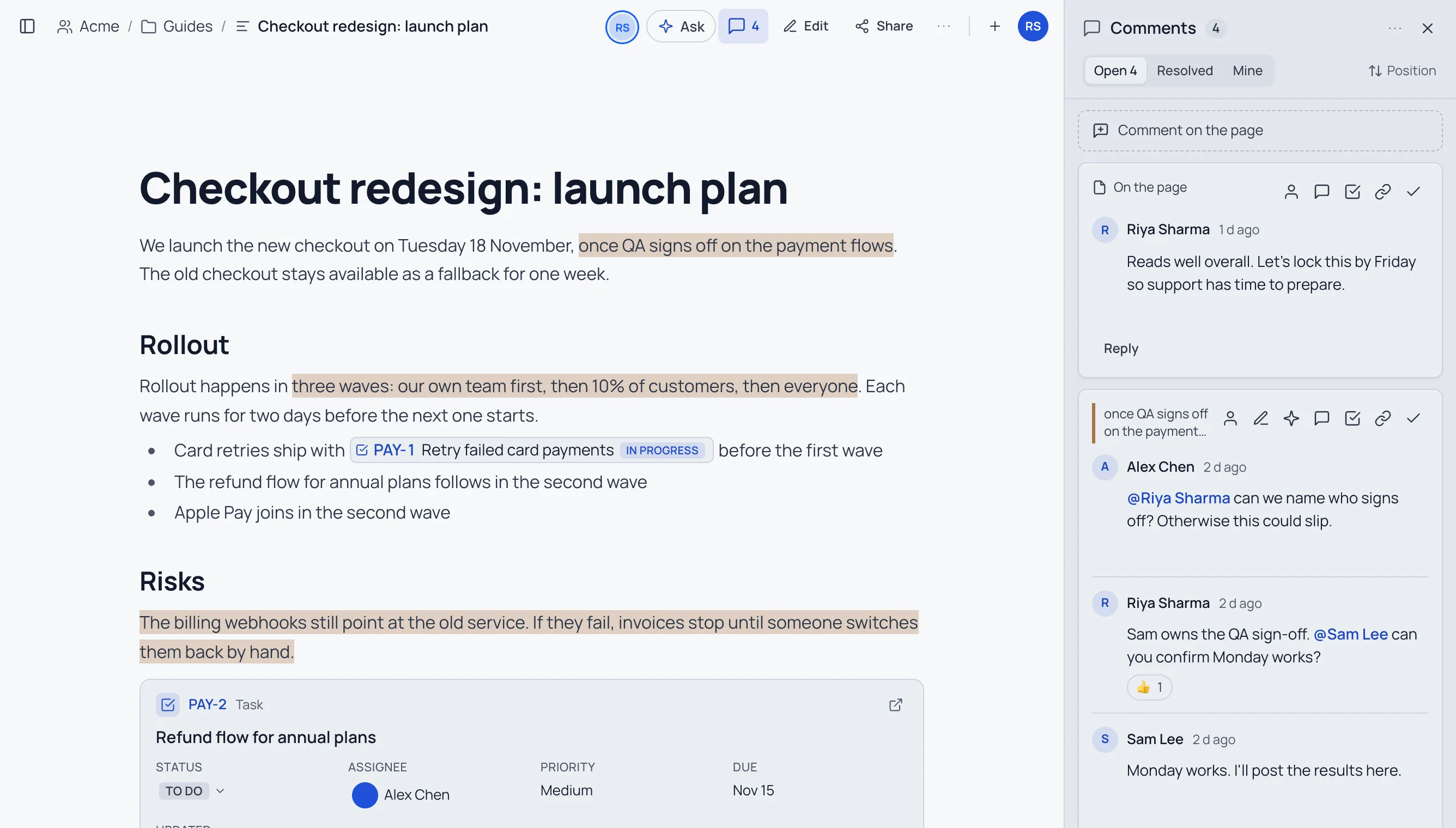
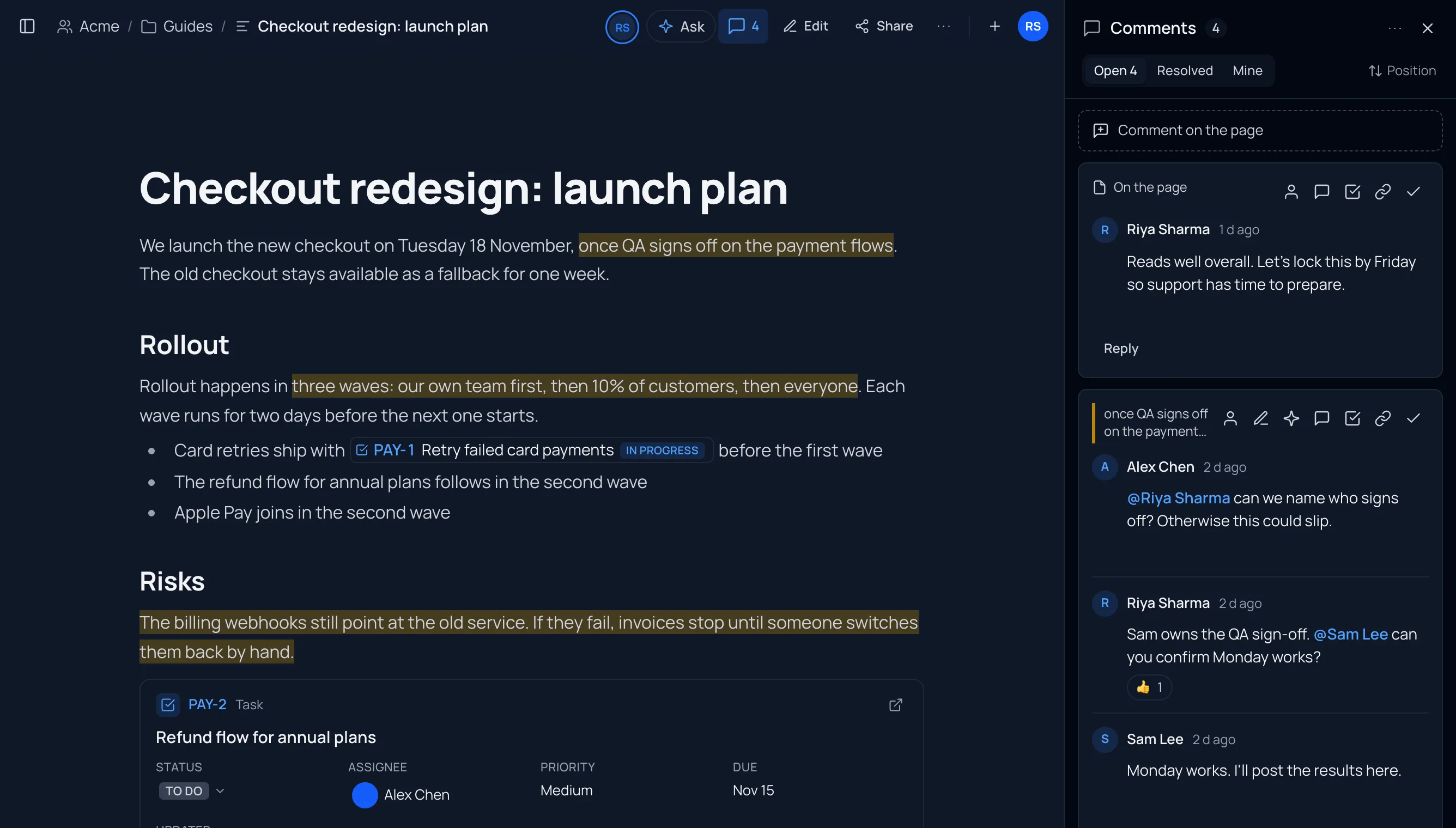
A launch plan page with highlighted passages and the comments panel beside it, and a Jira chip and card in the page.A launch plan page with highlighted passages and the comments panel beside it, and a Jira chip and card in the page.
NewPages

Comments on pages and documents, and Jira inside your pages

Comment on any part of a page or markdown document, like in Google Docs: reply, mention, resolve, suggest edits, assign tasks, get emails and Slack messages, and export with comments. And put live Jira issues in your pages, or turn a thread into an issue.

  • Web app
  • MCP server
  • API
  • Comment on anything. Select text and choose Comment (or press ⌘⌥M), comment on a whole block from the margin, or on the page as a whole. The page's text never changes.
  • Threads beside the text. On a wide screen each thread sits next to what it's about; on a phone the comments open as a sheet. New comments and replies show up live.
  • Reply, @mention, react, resolve. Mention someone who can open the page and they're told; mention someone who can't and you can share it with them first. Resolved threads keep their history and can be reopened.
  • Follows your edits. Comments move with the text they're about. If it's removed, the thread says so and shows the original words.
  • Assign as a task. An assigned thread shows in the person's home under Your action items and on the Team page; resolving it completes it.
  • Who sees them. Everyone signed in who can open the page. The owner can turn comments off for one item, or show them to readers who aren't signed in; workspace admins can turn them off for a workspace.
  • Suggested edits. On a comment about selected text, suggest the words that should replace it. People who can edit the page accept it in one click: the page changes, the change is its own version in the page's history (linked to the thread), and the thread resolves. If someone else is editing the page, the suggestion waits for them to apply it.
  • AI in comments. Apply with AI drafts the edit a thread asks for; Summarize discussion lists what was decided, what's open and who it's waiting on; write @AI in a thread to get an answer everyone in it can see; and a comment that reads as harsh is offered a kinder rewrite before it's posted. All within fair-use limits.
  • Images and files in comments. Attach or paste images, PDFs, Office files, zips and text files (up to 10 MB). Only people who can see the comments get a link.
  • Sign-offs see the discussion. Signing off while comment threads are still open asks you to confirm first, and every sign-off records how many threads were resolved and how many were open.
  • Comment emails, calmly. Mentions and assignments in comments are emailed right away; replies, new comments on your pages and resolved threads are gathered into one email every 15 minutes. Both follow the same calm rules as mentions: nothing you saw in the app, on your phone or in Slack; at most three a day; Email me less in every one. Choose under Settings › Account › Email.
  • A daily comments digest at 8:00 your time, only on days with something new: threads waiting on you and open threads on your pages.
  • Reply and resolve from Slack. A comment mention or assignment arrives as a direct message with Reply (answer right in Slack) and Resolve; push notifications ring for them too.
  • Comment insights. Open and resolved threads, the typical time to a first reply, time to resolve and the most-discussed sections, in the comments panel and in a new Comments tab of the page's analytics.
  • Export with comments, and Word export. Pages export as Word (.docx); Markdown, Word and PDF exports can include the comments: a Comments section in Markdown, margin comments or footnotes in Word, margin notes or notes at the end in a PDF.

Jira inside your pages

  • Chips, cards and live lists. Paste a Jira link and it becomes a chip; /jira, /Jira card and /Jira list add an issue or a table from a project, a saved filter or a JQL query, always current.

  • Change issues from the page. Every step of the issue's workflow (Jira asks for what a step needs), the assignee, a Jira comment, the title, priority and due date, made as you, so Jira's own permissions apply.

  • From text or a discussion. Select text and choose Create Jira issue: the text becomes the new issue's chip. A comment thread can become an issue too (Create Jira issue in the thread's menu), and resolving one offers to resolve the other.

  • Each reader sees their own Jira. Live details only through your own Atlassian account; everyone else sees the key and title. Lists run as each reader.

  • From your AI app. New MCP tools: list_comments, get_thread, add_comment, reply_comment, edit_comment, delete_comment, resolve_comment, reopen_comment, assign_thread, react_comment, set_comment_settings and list_waiting_on_me (what's waiting on you, across everything you can open) for threads; suggest_edit, accept_suggestion, reject_suggestion, withdraw_suggestion, summarize_discussion and comment_insights for review; get_comment_notifications and set_comment_notifications for your comment email, digest, push and Slack settings; insert_jira, update_jira_issue, list_jira_transitions and thread_to_jira (a thread becomes a linked issue, its chip optionally placed after the text) for Jira in pages. sign_off says when threads were still open, export_page takes format: word, comments and comment_status, get_document_analytics includes comment counts, and create_jira_issue puts the new issue's chip where the text was. The hosted server has 132 tools.

  • A clearer Monday Team summary. It's titled "Week of Nov 9: last week's highlights and what's due" and says which week each part is about: Last week (Nov 2 – 8) for highlights and decisions, Due this week (Nov 9 – 15), then Overdue and Blocked right now, in email and Slack alike; on Team, the card is This week so far.

  • A Collaboration section in the docs, with screenshots in light and dark and short clips of commenting, live threads, suggested edits, Apply with AI, Summarize, the phone sheet, Jira chips, cards, lists and turning a thread into an issue, and example prompts for AI apps.

Start with Collaboration: comments, suggested edits and AI help, notifications and Jira in pages.